It is — we scored the beginner use case 4.5 out of 5. The only thing that slows you down at the start is the sheer number of filters. Start with one vertical and one geo on the free Starter, and move to a paid plan once you know which slices you need every day.
The links to spytrend.com on this page are affiliate links: clicking one earns this desk a commission.
02How we measured it
How did we test SpyTrend?
This desk is funded by affiliate commission and we say so plainly: the SpyTrend links here are affiliate links, and Traffic Teardown is affiliate media rather than a neutral arbiter. So we publish the process and not just the verdict: how many days we tested, on which verticals and geos, and which six criteria at which weights add up to the final score. Here's exactly what we did by hand, so every number can be recalculated after us.
01
21 days of daily sessions
At least one search session every working day: new creatives on our own keywords, plus a check that the database had genuinely refreshed rather than serving us yesterday's feed.
02
4 verticals, 11 geos
Gambling (LatAm, India, CIS), nutra (Europe), e-commerce (US/UK/DE), dating (Turkey). The same query list for every combination, and the same run again against the TikTok feed.
03
Blind comparison against two competitors
The same query went into three tools back to back. We counted unique ads, duplicates, and results that were off-topic junk.
04
Support tickets from an ordinary account
Three tickets with no "we're the press" flag: a filter question, a billing question and a bug report. We timed how long it took to get a first reply from a human.
05
Checking the tool's claims against its own data
Everything SpyTrend says about itself, we tried to disprove inside the product. The claimed sub-second search we timed with a stopwatch on broad, unfiltered queries. The "live for 5+ days means profitable" rule we tested on a sample of fifty ads using the Days Active filter. The live active, inactive and vanished statuses we cross-checked against whether the ad still opens in Meta Ad Library itself.
06
Paying and cancelling with a real card
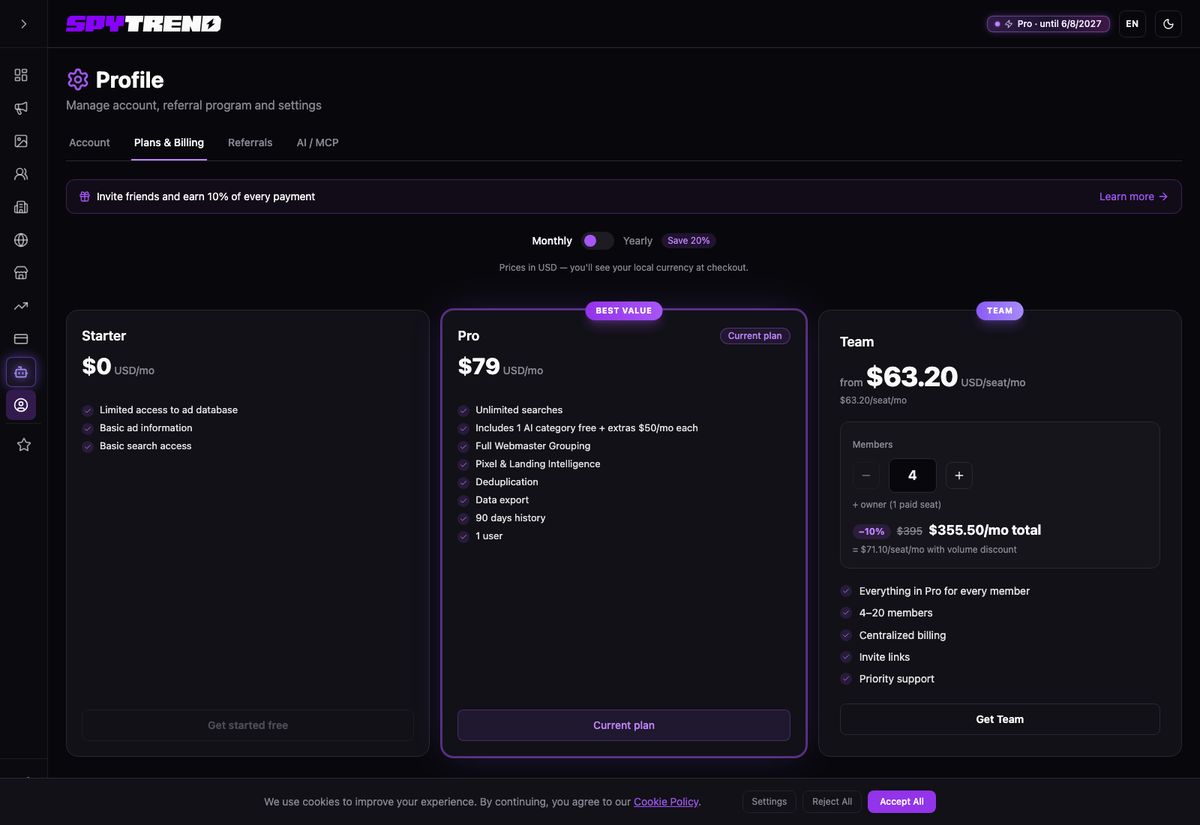
We paid $79 for Pro with an ordinary card through Stripe, waited for the charge to land, then cancelled the subscription in account settings. We were watching two things: whether hidden charges appear on top of the advertised price, and whether the promised 7-day refund works without an email thread. Along the way we worked out how the vertical model is built: on Pro one AI category is included in the plan, and the rest are switched on and off in the dashboard as separate modules at $50 a month.
Plans as they looked on the account we paid for: Pro at $79/mo, Team from $63.20 per seat, AI categories as separate $50 modules. Dashboard screenshot, August 2026.
Disclaimer: we did not measure database volume or plan pricing — those are the tool's own claims from its own site, and we label them that way. SpyTrend publicly states 1.1B+ ads in the database and 1B+ new ads a month; the price list is open at spytrend.com/pricing. Our own scores cover only what can be verified by hand: how fresh the results are, how accurate the AI categories are, coverage on specific geos, and how fast support replies. Public ratings for the tools we compared against come from Trustpilot: AdSpy and BigSpy. The full test protocol is on our methodology page.
03The core
Scored by use case, not by one blended average
A single overall score would hide the truth: the same tool can be excellent for gambling and merely average for local e-com. So we scored SpyTrend separately against each typical way of working.
Use case
For gambling
4.9★★★★★
The densest results of anything we ran: LatAm and India return fresh creatives in batches. The "gambling" AI category almost never confuses casino with betting — across three weeks we caught only isolated misses.
Use case
For nutra
4.8★★★★★
Europe is covered well, and you can see prelanders and angles as complete sets. Nutra and e-commerce sit in separate AI categories, so flipping through adjacent product offers is just a vertical switch.
Use case
For e-commerce
4.6★★★★★
Major geos and evergreen products — no complaints. On narrow local niches the results are thinner than in tools built specifically for e-com.
Use case
For a beginner
4.5★★★★★
The interface isn't intimidating, the sections are laid out logically, and you can start on the free Starter. The one catch is that there are a lot of filters straight away, and the first couple of evenings go on working out which three of them are yours.
Scores by criterion
Ad database4.9
Refresh speed4.8
Filters and search4.7
AI vertical categories4.9
Support4.6
Value for money4.2
The lowest score is price, and that's more a planning question than a complaint. The price list is transparent and open on the site, and the model is modular: base Pro is $79 per user with one AI category, and the other verticals get switched on when you need them and off just as easily. From four people up, Team works out cheaper — from $63.20 a seat, and 20% cheaper again on annual billing.
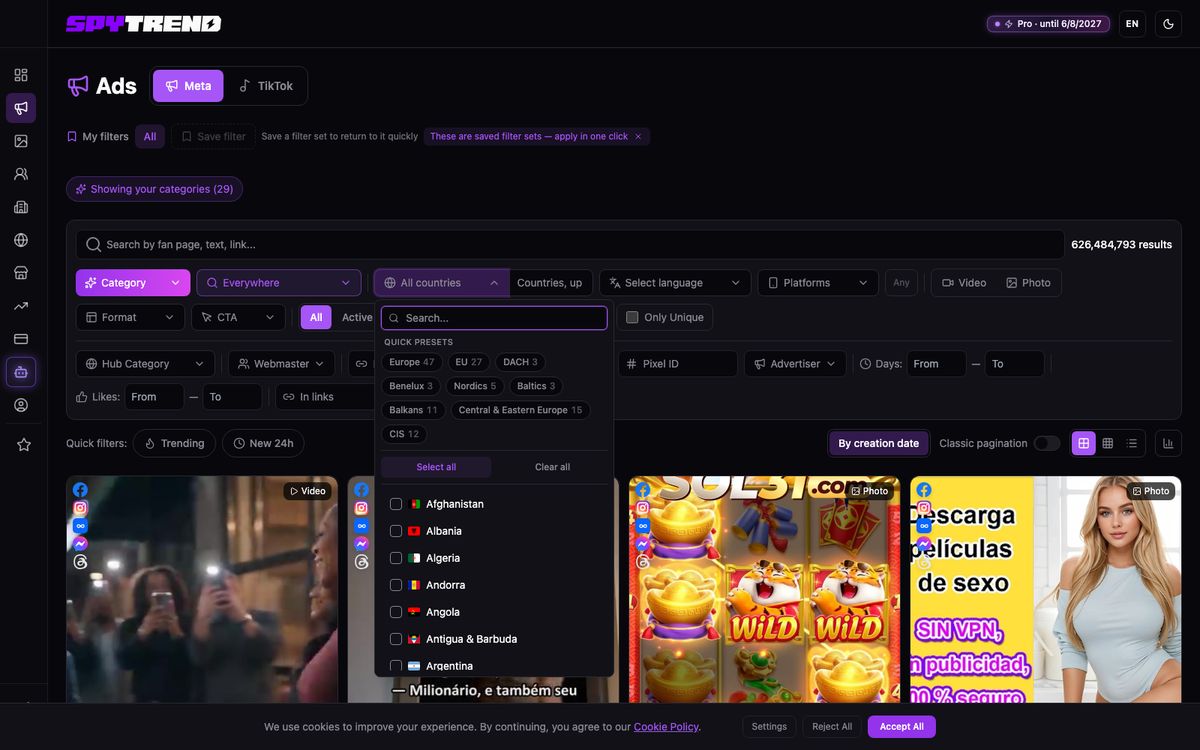
The filter row that earned “Filters and search” its 4.7: 193 countries, regional presets, and separate fields for domain, pixel and days active. Dashboard screenshot, August 2026.
04Common questions
What people ask most
Which geos is the database strongest on?
In our tests — LatAm, India, CIS and Europe. Narrow local markets feel weaker: there are objectively fewer ads there. In the country filter itself we counted 193 entries, with quick presets like Europe (47 countries), EU (27), DACH, Balkans and CIS. In the Creatives and Advertisers sections there's an Exclude column next to Include, which is handy for throwing out markets you don't work — the Ads section doesn't have that toggle yet. A country filter exists in every section, and Trends has a separate By GEO tab that breaks the market down country by country with the number of active ads, the number of fanpages and their average lifespan. That table is a good way to gauge how aggressive moderation is in a given country before you go in.
Is SpyTrend suitable for a beginner?
It is — we scored that use case 4.5. The interface is clear and the sections are logical; the only thing that slows you down at the start is the sheer number of filters: geo, language, format, CTA, domain, pixel, days active. Start with one vertical and one geo on the free Starter, and move to a paid plan once you know which slices you need every day.
Is using a spy tool legal?
The data itself is public: Meta Ad Library is an open ad transparency tool, and spy services index exactly that output. Legally SpyTrend operates as a SaaS subscription from the Cyprus company Yasha Limited, with payments through Stripe. The risk doesn't sit in watching someone else's ads — it sits in what you do with what you find: copying a competitor's creative wholesale is a copyright argument and a question for the platform's moderation, not for the spy tool.
05Voices from the market
Reviews from buyers who started from scratch
These SpyTrend reviews were collected from SpyTrend's Telegram channels and from the vendor's own conversations with users — we name the source outright. We publish only the ones whose authors agreed to it; every author's profile was checked by hand, and the «✓ Verified» mark sits where that check passed. The set holds 15 reviews and 13 passed the check; this page carries 4 of them, 3 of those marked. The rest are sorted by topic: SpyTrend reviews, pricing, SpyTrend or AdSpy, SpyTrend or BigSpy. We did not edit anyone's style — we only stripped contacts and network names.
PH
ProfitHunter ✓ Verified
E-com · US
★★★★★
I'm under a month in. First impression: clean, nothing extra, you're not hunting for things three clicks deep. I went into the TikTok tab and pulled a pile of ideas for my US ecom, the formats there are genuinely fresh. I would like it to hold as much as the Meta side does, of course — the TikTok feed is visibly younger and thinner. Hopefully it catches up. Good impression overall, 4 out of 5.
SpyTrend Team replies
Thanks for taking the time! You're right — our TikTok feed is younger than the Meta one, which is where the volume gap comes from: 34M ads there against well over a billion on Meta, and it grows every day. A tip meanwhile: inside the TikTok tab, sort by Days Active — fresh formats surface noticeably faster that way.
ND
nutra_dealer_77 ✓ Verified
Nutra · PL/RO
★★★★★
Good experience. I'm new-ish to nutra, ran CIS only before that, then moved into Eastern Europe and had no idea where to begin. The geo filter here has ready presets. I clicked Central & Eastern Europe and got 15 countries in one go rather than assembling a list by hand. Poland and Romania were sorted in an evening. Support replies the same day. Recommend it to anyone stepping into a new geo.
VD
Vika_Dropship ✓ Verified
E-com · DE
★★★★★
The tool itself is strong, no argument there: German ecom comes up fast, the dedup works, export is in place. The star comes off for the learning side, which barely exists. What I personally missed: 1) short videos per section — it took me a week to work out how Creatives differ from Ads and what Hubs are even for; 2) task-shaped walkthroughs such as "find a competitor by domain" or "pull a webmaster's network"; right now you get there on your own; 3) an explanation of what the statuses mean and why an ad turns vanished. I figured it out in half an hour (by poking around), but half an hour is half an hour and not everybody is that patient. Product five, docs three, hence four.
SpyTrend Team replies
Thank you, we're picking this up — tutorials are a request that reaches us regularly and a fair one. A shortcut in the meantime: the blog has a walkthrough for every section, Hubs and Trends included, and the statuses are spelled out in the help — active means it's running now, inactive means stopped, vanished means it dropped out of Meta's results. Also store your working filter set with Save filter so you're not rebuilding it each time.
JP
Junior_Pavel
Gambling · newcomer
★★★★★
Fast and easy to read, i'm a complete beginner and worked it out alone. The first angle I found in here is still feeding me. thanks guys